
How PVology works
One foundation inside every application
PVology applications share one account, one set of permissions, one audit trail and the services below. They are not applications and you do not buy them separately: they work inside the applications you use.
Customer 360
One view of each customer across PVology.
- A customer's Dealflow contacts and deals next to their ProjectOrbit projects
- A won deal becomes a project for the same customer
- Shared by every application, within each person's permissions
PVology AI and Ask PVology
Assistance inside the applications, always within your permissions.
- Ask PVology: questions about your work answered from your own records with sources, and questions about your knowledge and approved experience
- Summaries and drafts in parts of PVology, such as Dealflow deal summaries and ProjectOrbit drafts
- Only where your plan, your organization's AI policy and the service configuration allow it
- Suggestions are drafts: people review and decide
Assess
The assessment engine behind maturity and readiness assessments.
- Answer structured statements from 1 to 5 and see a score out of 100
- See where to improve first and your strengths
- One assessment today, the Value Management Maturity Check; your own templates are not available yet
Decisions and notifications
Everything waiting for your decision or action, across your applications.
- One list of approvals and actions from the applications you use
- Notifications in PVology and by email, with your own preferences
Reports
Reports from the same records, without copying them into slides.
- Generate a report from an application register and download it as Word or Excel, or print it to PDF
- ProjectOrbit adds audience reports with PowerPoint exports and a customer portal
Connect
Integrations & Enterprise Connectivity: connect PVology with the systems you already use.
- Connections to your own systems with encrypted credentials, tests, health with reasons and logs
- Mappings, imports and exports with a dry run first, and syncs that never hide a failed record
- Signed webhooks with event versions, and the PVology API with API clients, scopes and an OpenAPI description
- Enterprise identity readiness (single sign-on and SCIM), switched on per organization after a joint test
- Every connector honestly labelled with what works today
Assess can still be chosen in plans exactly as before. Presenting it as a platform service changes nothing in your plan, licences, prices or records.
The foundation
What every application shares
You meet these in every application, with the same account and the same rules.
- Identity and sign-in
- One PVology account with optional two-factor authentication.
- Organizations and members
- Workspaces for your organization, with members, invitations and licences per person.
- Roles and permissions
- Organization roles decide what each person can see and do in every application.
- Audit trail
- Important changes are recorded with who made them and when.
- Search
- Find records across the applications you can open, including by their older names.
- Documents and knowledge
- Documents attached to your work, and an organization knowledge base Ask PVology can draw on.
- PVology Connect
- Integrations: connections, mappings, imports and exports, sync, signed webhooks, the PVology API and enterprise identity readiness.
- Sample data
- Fictional sample records you can add and remove to explore safely.
- Analytics
- Governed measures and dashboards built from the same records.
Power Mode · Available now
A command center built on these services
Six capabilities released this year, shown with real screens from a fictional organization: the Executive Command Center, Automation Studio, Ask PVology, Analytics Studio, the PVology Connect and ProjectOrbit.
 Available now
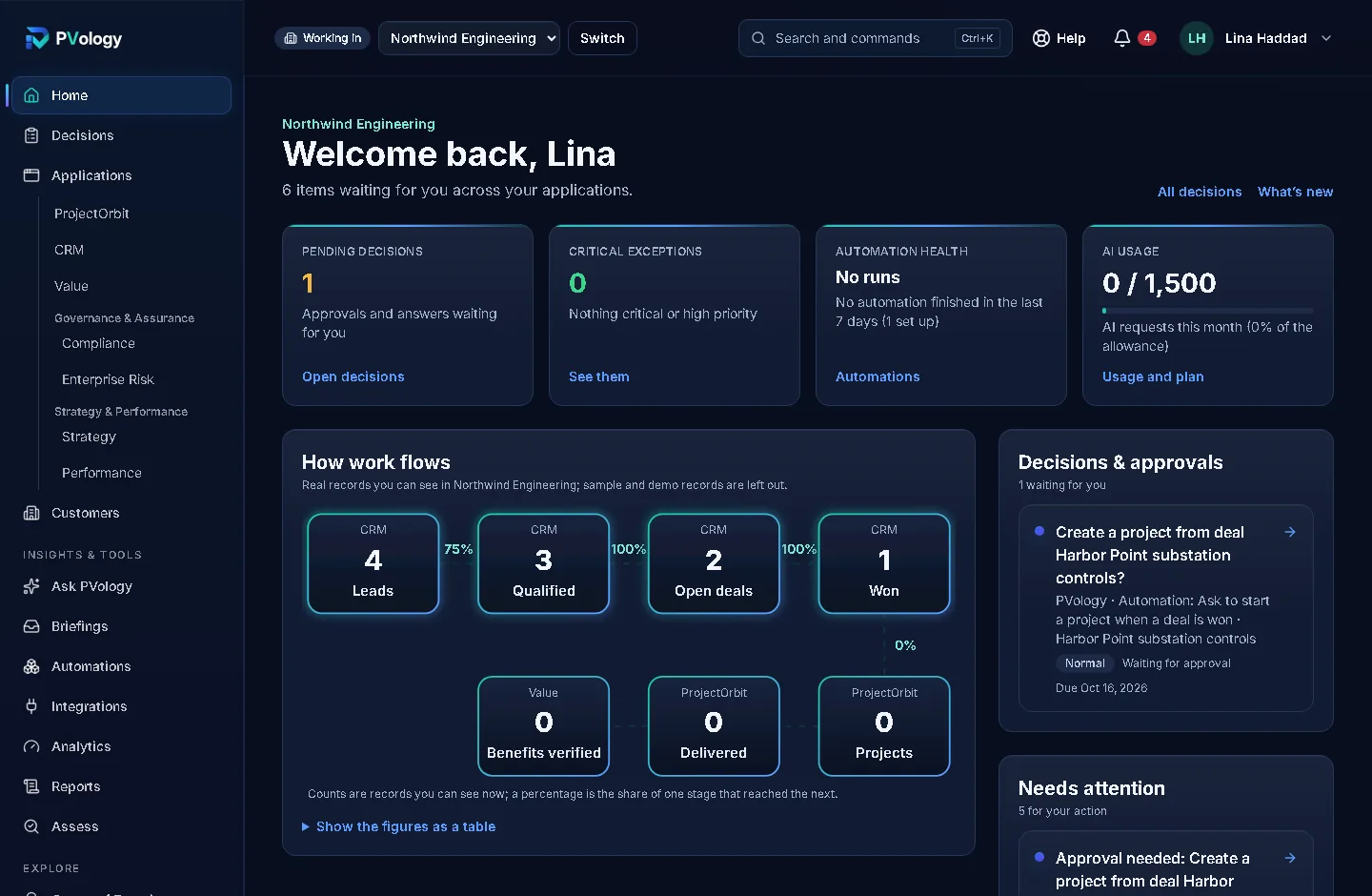
Executive Command Center
Start the day from one screen of real figures: decisions waiting, critical items, automation health and AI use.
See Executive Command Center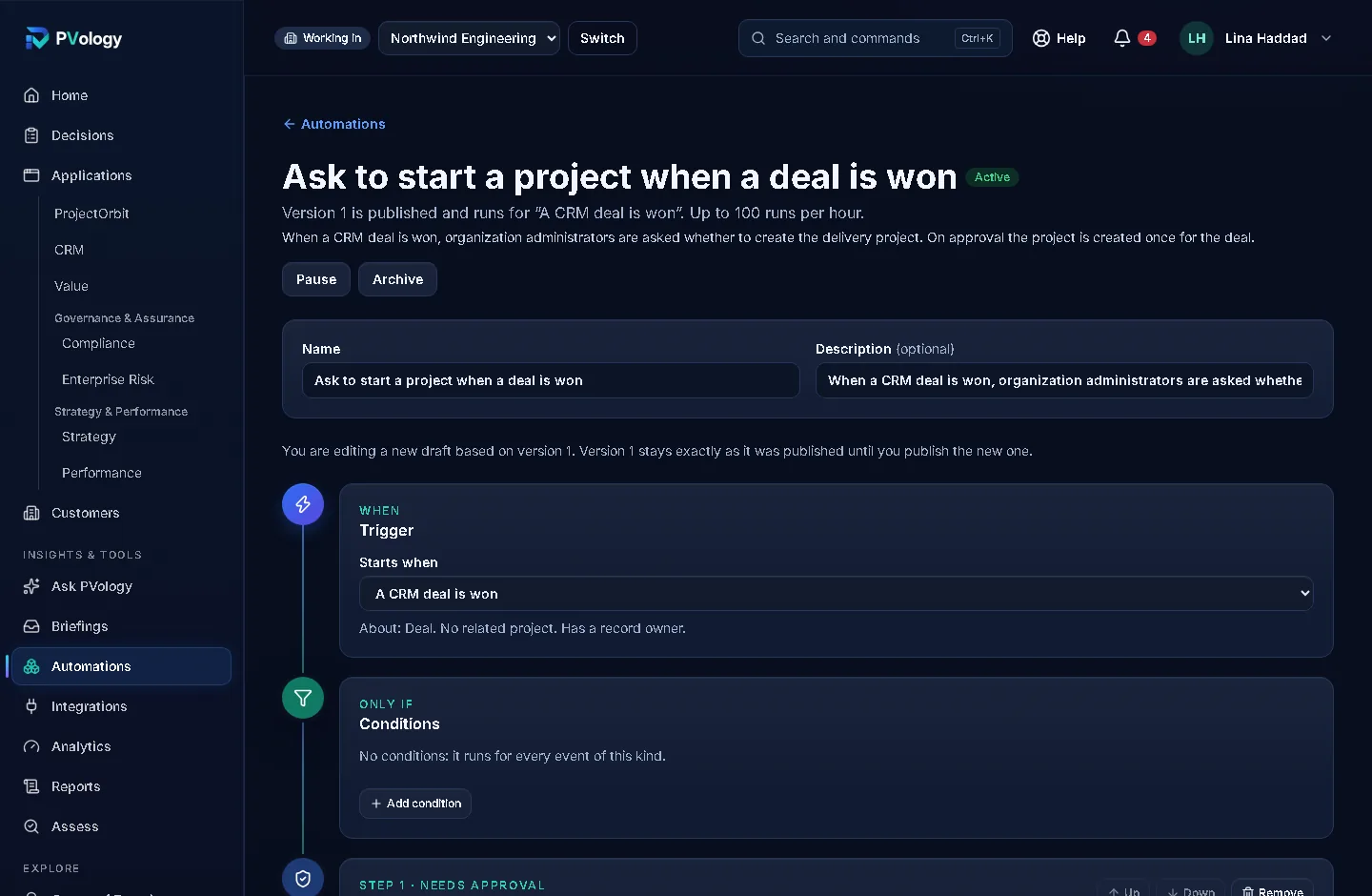 Available now
Automation Studio
Turn "when this happens, do that" into a tested, approved routine instead of a reminder someone forgets.
See Automation Studio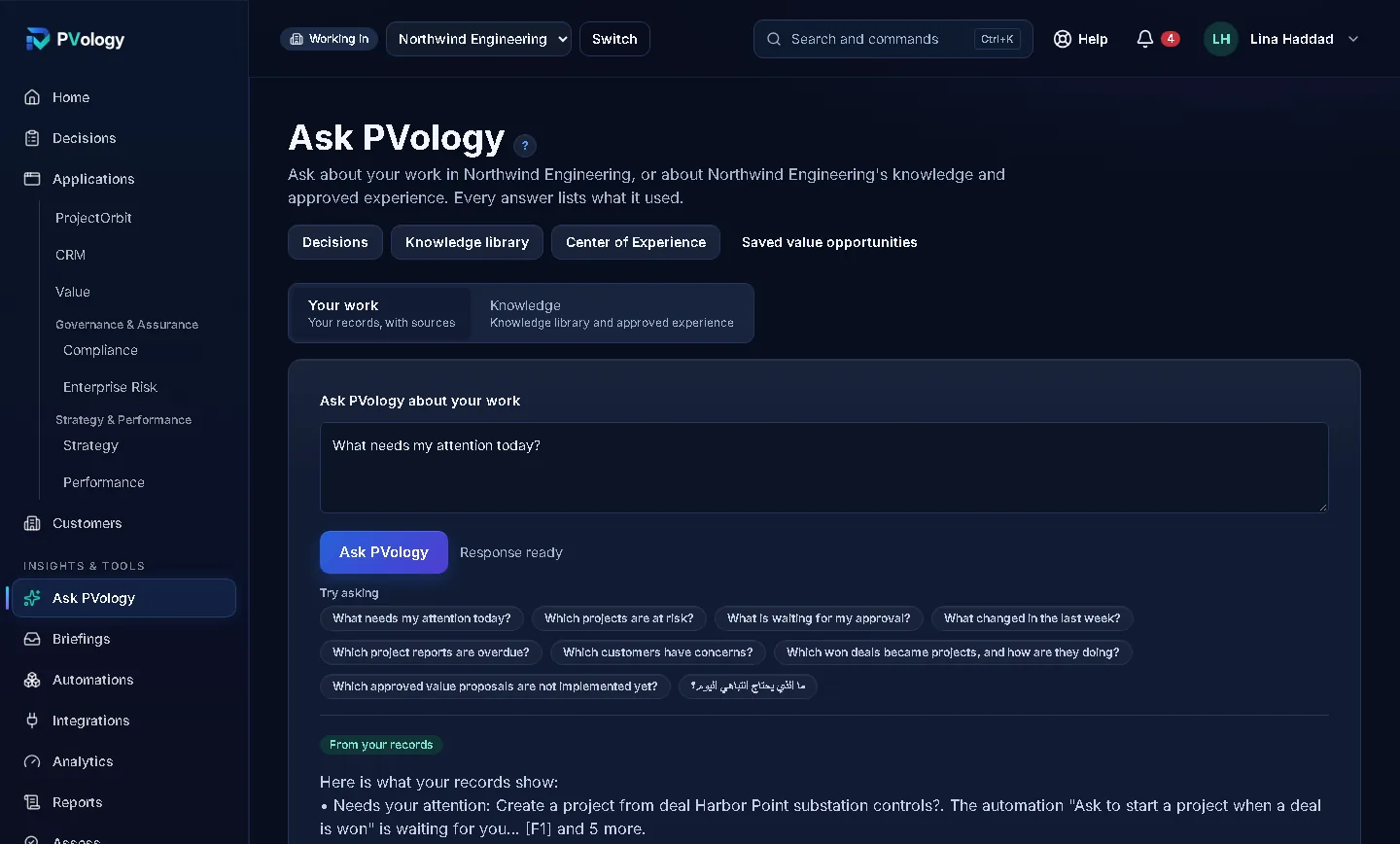 Available now
Ask PVology
Ask about your work in plain words and get an answer from records you are allowed to open, with sources.
See Ask PVology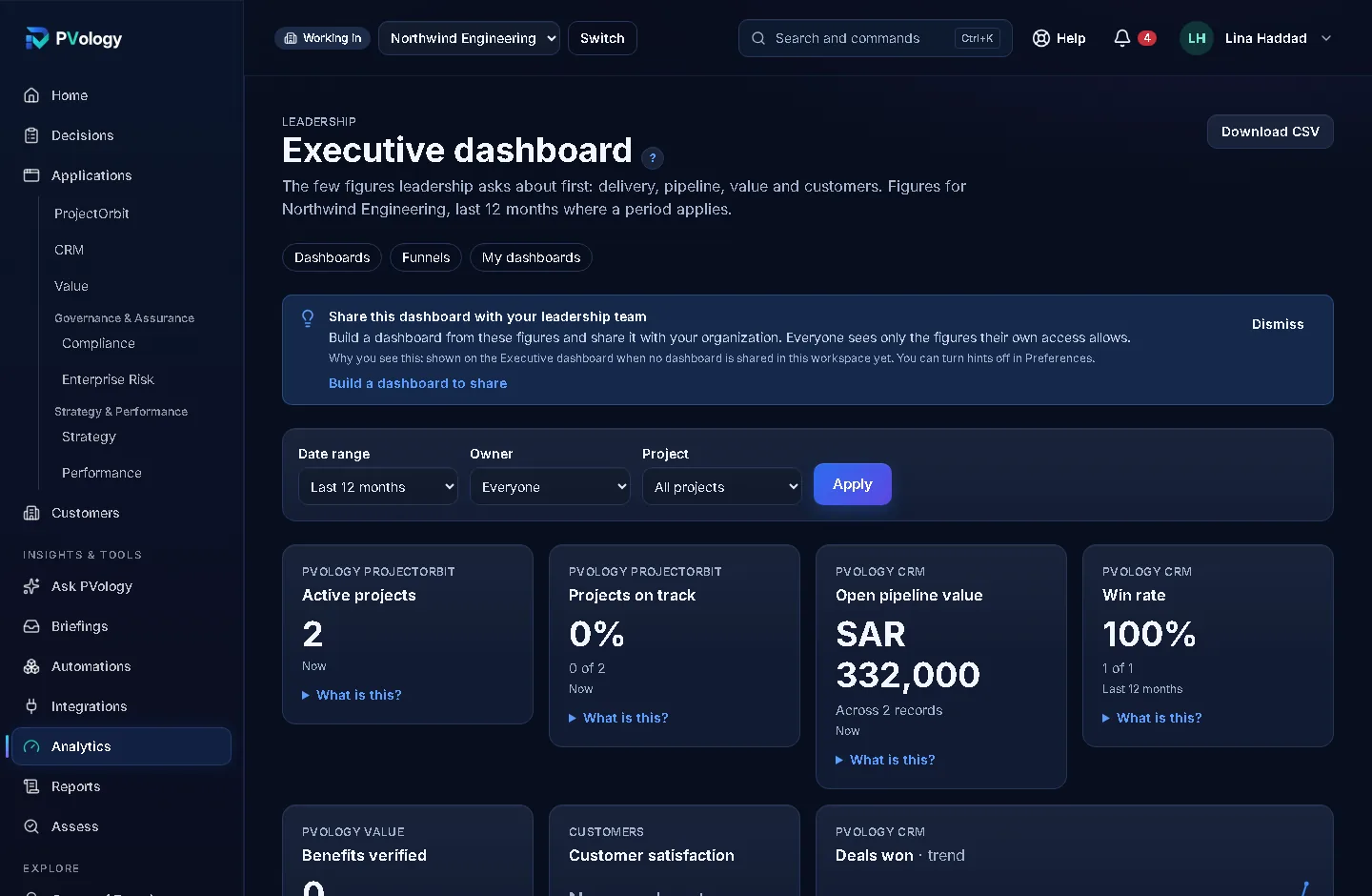 Available now
Analytics Studio
One definition for every figure, so leadership, PMO and sales read the same number the same way.
See Analytics Studio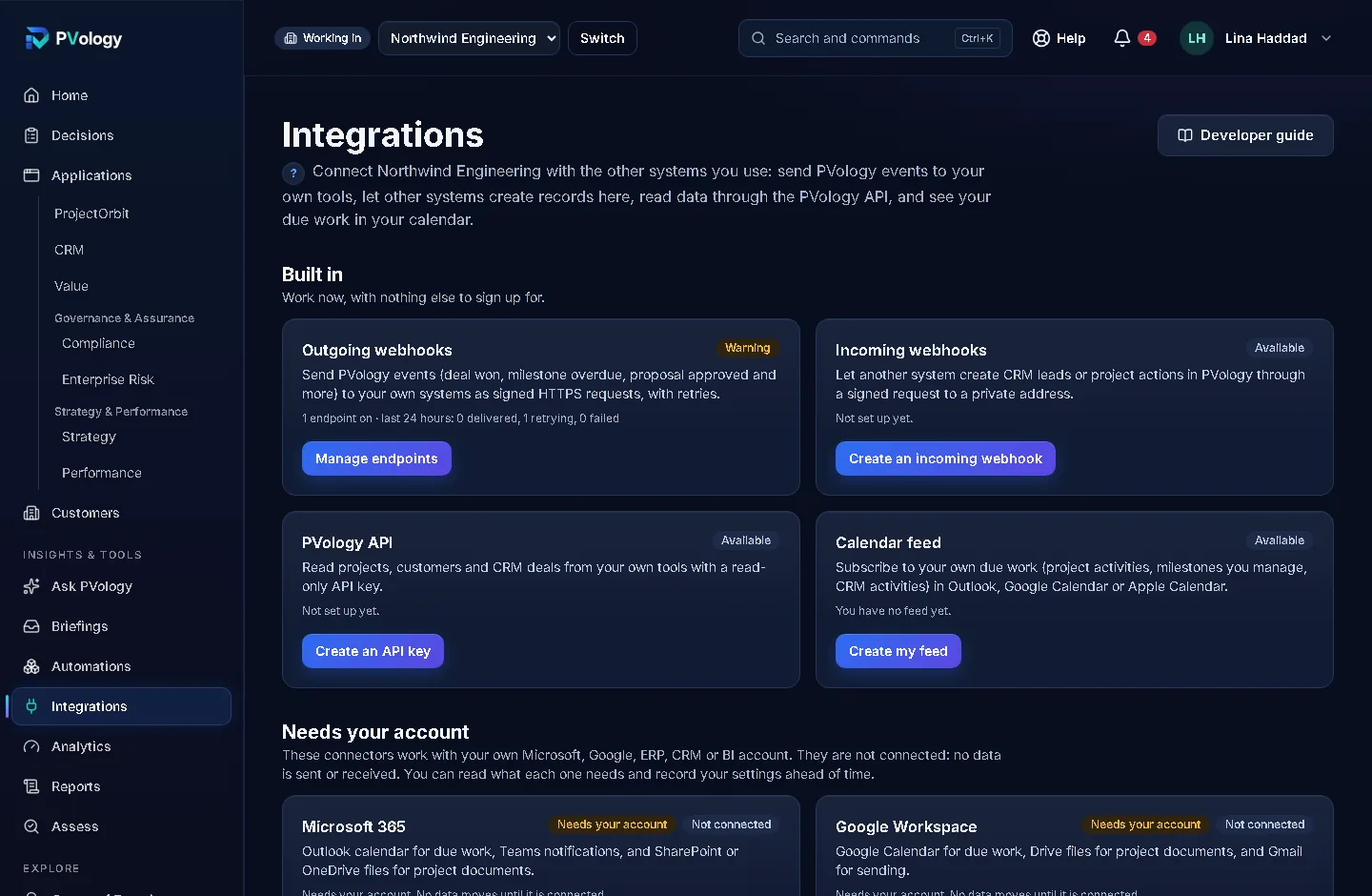 Available now
Connect
Connect PVology to your own systems: tested connections, imports with a dry run, sync, signed webhooks and the PVology API, available now.
See Connect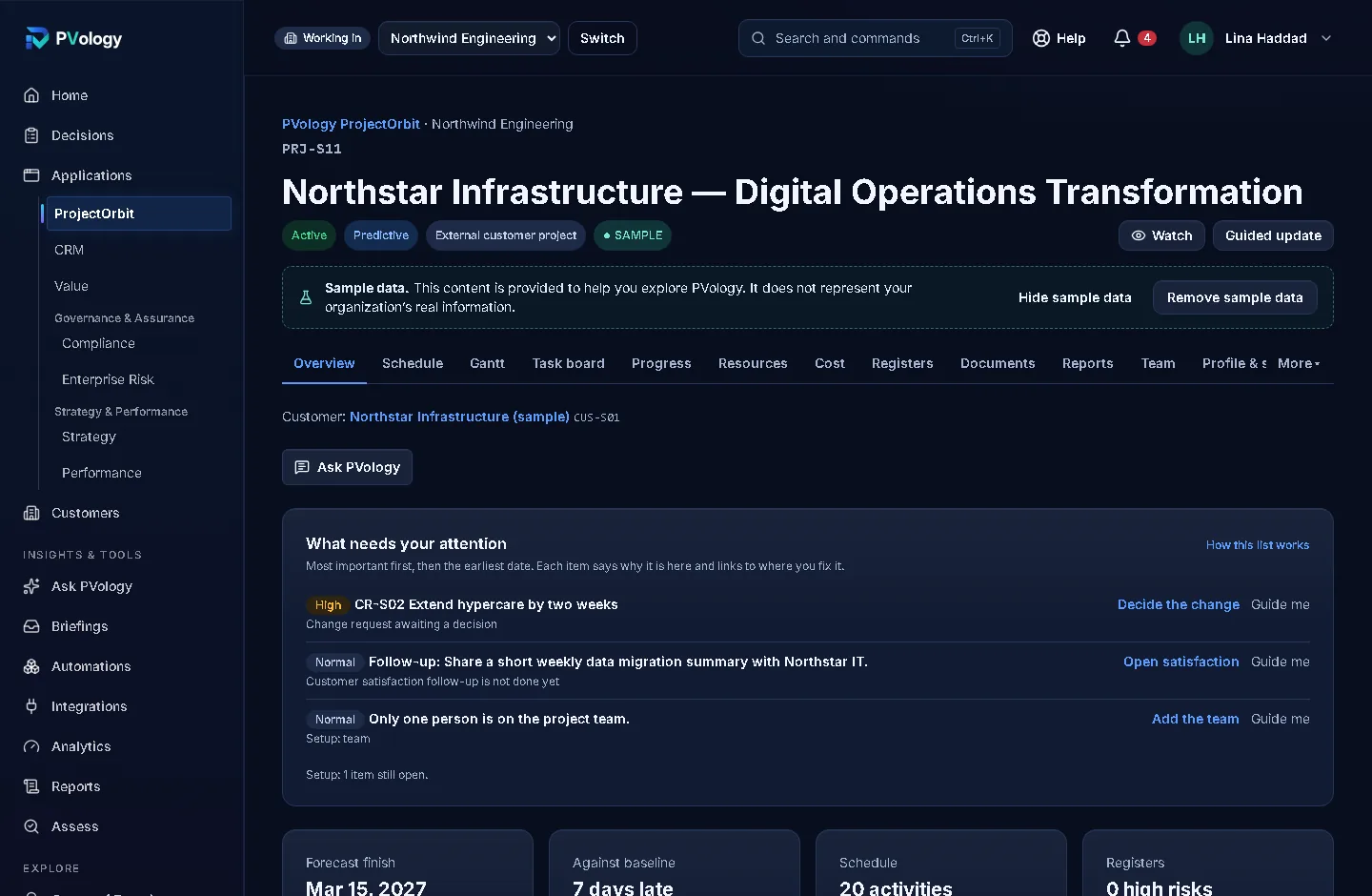 Available now
ProjectOrbit
See what needs attention on each project, with the reason and a direct link to fix it.
See ProjectOrbit
How it fits together
One ecosystem, six everyday stories
Each step links to the application or service that does it today.
Sell → Deliver → Measure → Improve
From the first conversation to the benefit the customer actually received.
- 01 · SellDealflowLeads and deals with clear next steps; a won deal becomes a project for the same customer.Open Dealflow
- 02 · DeliverProjectOrbitPlan, run and report the project, with the customer portal for the customer's view.Open ProjectOrbit
- 03 · MeasureValueLensRecord the benefits you planned and verify the ones you realized.Open ValueLens
- 04 · ImproveAnalytics StudioFollow lead to deal to project to verified benefit in one funnel and see where work slows down.Open Analytics Studio
Identify → Act → Verify
From a compliance gap to a closed, reported remediation.
- 01 · IdentifyComplianceRecord the obligation, its owner and due date, and see what is not compliant.Open Compliance
- 02 · ActProjectOrbitCreate a remediation project from the obligation and run it with owners and dates.Open ProjectOrbit
- 03 · VerifyEvidenceKeep the evidence with its owner, validity and review, and close a finding only after someone else verifies the remediation.Open Evidence
- 04 · ReportReportingGenerate the compliance report and follow gap to remediation to closure in Analytics.Open Reporting
Direct → Deliver → Govern → Realize
From strategic direction to the outcome it was meant to achieve.
- 01 · DirectStrategyPulseSet objectives and measures with versioned targets; a measure with no actual says No data, never on track.Open StrategyPulse
- 02 · DeliverProjectOrbitA strategic initiative creates or links its project, and the project shows the objective it serves.Open ProjectOrbit
- 03 · GovernGovernance & AssuranceRisks that threaten an objective are linked to it, with any appetite exception shown on the objective.Open Governance & Assurance
- 04 · RealizeValueLensA value study shows the benefit; the outcome owner decides from the evidence whether it was realized.Open ValueLens
Identify → Analyze → Improve → Sustain
From a signal that something is wrong to an improvement that lasts.
- 01 · IdentifyStrategyPulseAn off-track KPI or an unrealized outcome starts an improvement opportunity; findings, project lessons and customer patterns can too.Open StrategyPulse
- 02 · AnalyzeOpsCatalystMap the process, find the causes with evidence and compare countermeasures; human error is never the final cause.Open OpsCatalyst
- 03 · ImproveProjectOrbitSmall changes run as shared actions and pilots; a large change runs as one ProjectOrbit project created from the case.Open ProjectOrbit
- 04 · SustainGovernance & AssuranceA CAPA proven effective tells the finding's owner, who verifies and closes the finding; the improvement is checked again months later.Open Governance & Assurance
Connect → Feed → Review → Publish
From the systems you already use to trusted records in PVology, and back out.
- 01 · ConnectPVology ConnectConnect your own system with a tested, encrypted credential, map its fields and preview a dry run before anything changes.Open PVology Connect
- 02 · FeedStrategyPulseKPI actuals arrive per period; a failed feed shows as a failure, never as 0.Open StrategyPulse
- 03 · ReviewGovernance & AssuranceEvidence from other systems arrives as candidates; a person reviews it before it counts.Open Governance & Assurance
- 04 · PublishWebhooks and APISigned, versioned events and the PVology API keep your other systems up to date.Open Webhooks and API
Learn → Apply → Improve
From learning how to work well to doing it every day, and seeing the result.
- 01 · LearnPVology AcademyCourses and guided practice with fictional data in a learner sandbox.Open PVology Academy
- 02 · ApplyApplicationsUse what you learned in ProjectOrbit, Dealflow, ValueLens and the other applications.Open Applications
- 03 · AutomateAutomationsMake the routine steps automatic, with tests and approvals.Open Automations
- 04 · ImproveAnalyticsCheck the effect on the measures that matter, defined the same way for everyone.Open Analytics
The applications built on it
ProjectOrbit, ValueLens, Governance & Assurance, StrategyPulse, Dealflow and OpsCatalyst use this foundation today. See the applications
Not sure where to start?
Describe what you want to improve and Ask PVology will suggest a starting point.