
PVology Connect — Integrations & Enterprise Connectivity
Connectors, honestly labelled
Every connector below is marked Available, Beta, Coming soon or Planned, straight from the product's own catalog. Nothing is shown as connected unless it works today.
PVology Connect
One place to connect, in the app
In the app (Menu → Insights & tools → Connect) each connection has its credential, test, health with reasons, mappings, syncs and logs. Organization policies decide which kinds of integration are allowed.
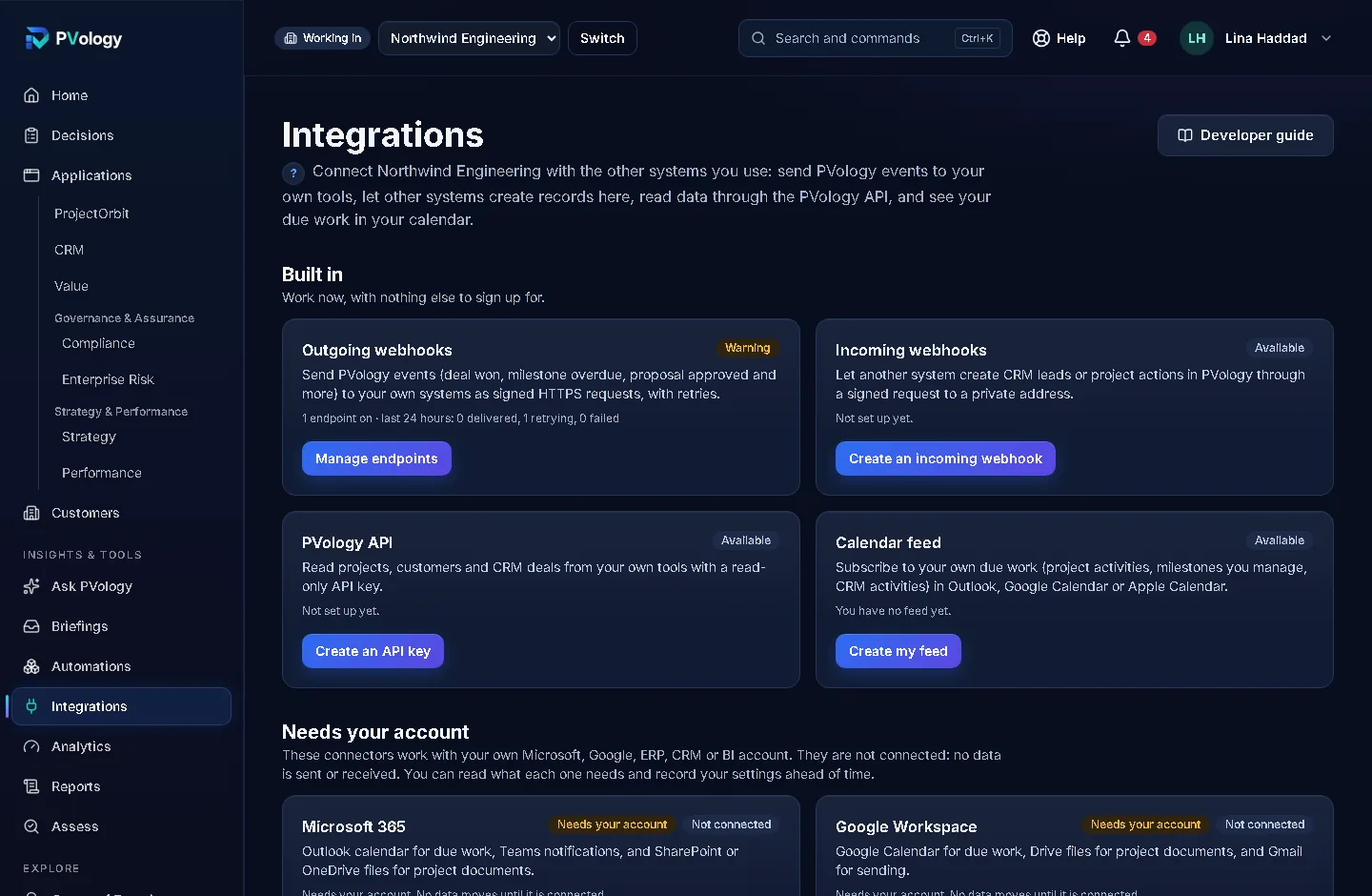
Available now
AvailableWorks today, with nothing else to sign up for. Set up in PVology Connect by organization owners, administrators and Integration Administrators (the calendar feed by each person).
Outgoing webhooks
AvailableSend PVology events (deal won, milestone overdue, proposal approved and more) to your own systems as signed HTTPS requests, with retries.
Other side: PVology
Incoming webhooks
AvailableLet another system create CRM leads or project actions in PVology through a signed request to a private address.
Other side: PVology
PVology API
AvailableRead and send data from your own tools with an API client (a service account): scopes you choose, no scope by default, rate limits with headers, idempotent writes that go through each application's own rules, and an OpenAPI 3.1 description.
Other side: PVology
Calendar feed
AvailableSubscribe to your own due work (project activities, milestones you manage, CRM activities) in Outlook, Google Calendar or Apple Calendar.
Other side: PVology
Sample system (sandbox)
AvailableNorth River ERP — Sample, a built-in practice system. It runs inside PVology, never calls the internet and changes no business data, so you can try every Connect step safely.
Other side: PVology
Structured file import (CSV, Excel, JSON)
AvailableOne import engine for every application: upload a CSV, Excel or JSON file, map its columns, review a dry run of exactly what would happen, then apply it. Records are recognised by the other system's ID, so a second import never duplicates them.
Other side: PVology
Structured file export
AvailableOne safe CSV and Excel writer with field-level export rules: only what you may see, financial fields only with finance access, spreadsheet formulas neutralized. Every register export in PVology uses the same cell rule.
Other side: PVology
Project schedule files (XML and XER)
AvailableProjectOrbit imports and exports project schedules as Microsoft Project XML and P6 XER files (file exchange, not a live connection).
Other side: PVology
Beta
BetaWorks today and is still being refined. It connects your organization's own system with your own credential; tell us what you find.
Generic REST connection
BetaYour own system, your own credential
Connect your own system's REST API with your own credential: test it, say where each kind of record is in your API, map its fields, dry-run, then sync on demand or on a schedule. Two-way connections send back only the fields PVology owns.
Other side: Your organization's own system
Coming soon
Coming soonBuilt and tested, and switched off until PVology switches it on for your organization after a joint test with your provider. Available on request.
Single sign-on (OpenID Connect)
Coming soonAvailable on request after a joint test
Sign in with your organization's OpenID Connect-compatible identity provider. Prepare and test it in Connect → Identity; PVology switches it on for your organization after a joint test with your provider. Owners always keep password sign-in.
Other side: Your identity provider
User provisioning (SCIM 2.0)
Coming soonAvailable on request after a joint test
Create, update and deactivate memberships from your identity provider. Deactivation never deletes a person, their records or the audit trail. Prepare the token in Connect → Identity; PVology switches provisioning on after a joint test.
Other side: Your identity provider
Planned
PlannedNot available. Some are prepared and need your own account and an app registration done together with you; the rest are not built yet. No data moves until a connector works, and we announce it only then.
Business intelligence
PlannedNeeds your account
Refresh dashboards in your BI tool from the read-only PVology API.
Other side: Your BI tool
Microsoft 365
PlannedNeeds your account
Outlook calendar for due work, Teams notifications, and SharePoint or OneDrive files for project documents.
Other side: Microsoft
Microsoft Entra ID single sign-on
PlannedNeeds your account
A single sign-on template for Microsoft Entra ID, on top of PVology's OpenID Connect sign-in.
Other side: Microsoft
Google Workspace
PlannedNeeds your account
Google Calendar for due work, Drive files for project documents, and Gmail for sending.
Other side: Google
ERP and accounting
PlannedNeeds your account
Exchange customers, invoices, purchase orders and cost actuals with your ERP through its REST API.
Other side: Your ERP or accounting system
External CRM
PlannedNeeds your account
Keep companies, contacts and deals in step with another CRM, with one source of truth.
Other side: Your other CRM
Meta (WhatsApp Business, Facebook lead forms)
PlannedNeeds your account
WhatsApp Business notifications and Facebook lead forms into Dealflow leads.
Other side: Meta
LinkedIn
PlannedNeeds your account
Lead and company data into Dealflow.
Other side: LinkedIn
Jira Cloud
PlannedNeeds your account
Project and issue data into ProjectOrbit.
Other side: Atlassian
Single sign-on (SAML)
PlannedSAML sign-in for identity providers that do not offer OpenID Connect.
Other side: Your identity provider
Process data feeds
PlannedOperational measurements into OpsCatalyst as improvement candidates, ready for statistical process control.
Other side: Your operational systems
SAP and Oracle ERP
PlannedEnterprise ERP templates on the Connect framework.
Other side: SAP, Oracle
ServiceNow
PlannedService and change records alongside OpsCatalyst and ProjectOrbit.
Other side: ServiceNow
HR systems
PlannedPeople and organization structure for resources and roles.
Other side: Your HR system
Data warehouses
PlannedScheduled exports of PVology data to your data warehouse.
Other side: Your data platform
Document management systems
PlannedProject and evidence documents kept in your document system.
Other side: Your document system
Automation platforms
PlannedPVology events and actions in automation platforms (through webhooks and the API today).
Other side: Your automation platform
Live schedule sync
PlannedTwo-way schedule sync with scheduling tools (today: file exchange).
Other side: Your scheduling tool
Process mining and telemetry
PlannedEvent logs and sensor data for process analysis.
Other side: Your operational systems
Regional data connectors
PlannedConnectors that keep data in a chosen region.
Other side: Regional systems
Built to be safe by default
- Connection credentials are encrypted and never shown again; API keys, client secrets and tokens are kept only as fingerprints.
- Outgoing calls and webhooks go to public HTTPS addresses only, checked so PVology never calls internal networks; redirects are not followed.
- Webhooks are signed and retried; incoming webhooks need a valid signature and refuse replays.
- API clients get only the permissions you choose; nothing is granted by default.
- Imports and syncs show a dry run first, never duplicate records and never hide a record that did not go in.
No third-party connection is claimed
Have an integration requirement?
Tell us which systems matter to you. It helps us prioritize.